Built around your family. Designed for childhood.

From the first welcome screen to the last “goodnight,” every part of Cova is shaped by one question: what do kids and parents actually need from AI?

SETUP & CHILD EXPERIENCE

From first launch to everyday use

Onboarding

A welcome that feels like opening a gift.

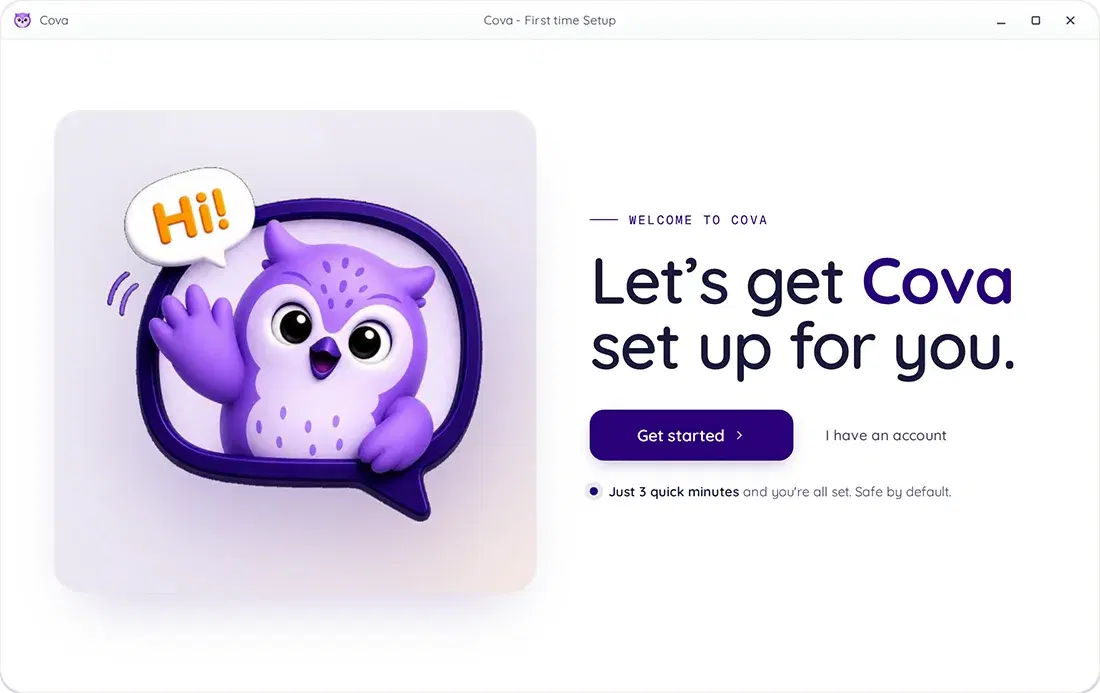
A warm intro, an account, a child profile. No corporate forms. No legalese. Three quick minutes and you're set · safe by default.

Under three minutes from start to finish
One install, the whole family is covered
Switch between kid profiles with one click
Cova onboarding setup
Child Profiles

One family.
Each child’s own space.

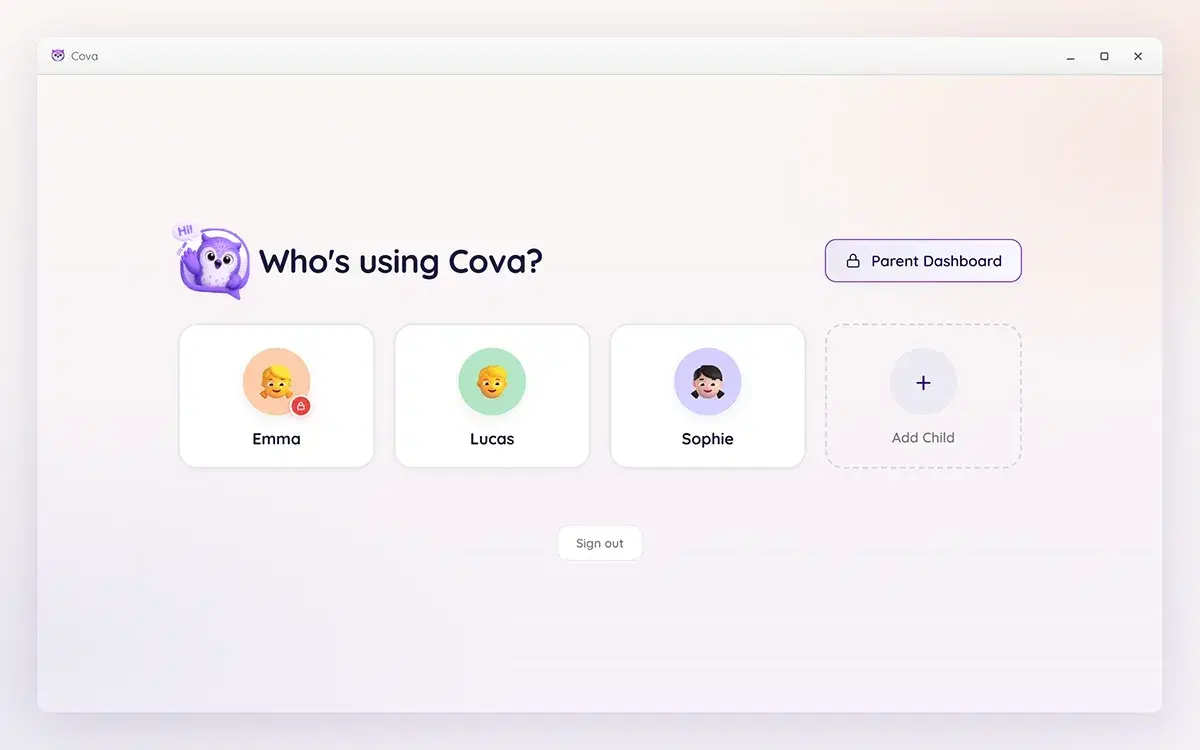
Every child in your family gets their own profile · with their own age settings, guardrails, and conversation history. Children can only see their own profile.

Separate profile for every child in the family
Children cannot access sibling profiles or parent controls
Parent dashboard secured behind a PIN you set
Child profile selection
AI Hero

Eight friendly buddies. One safe playground.

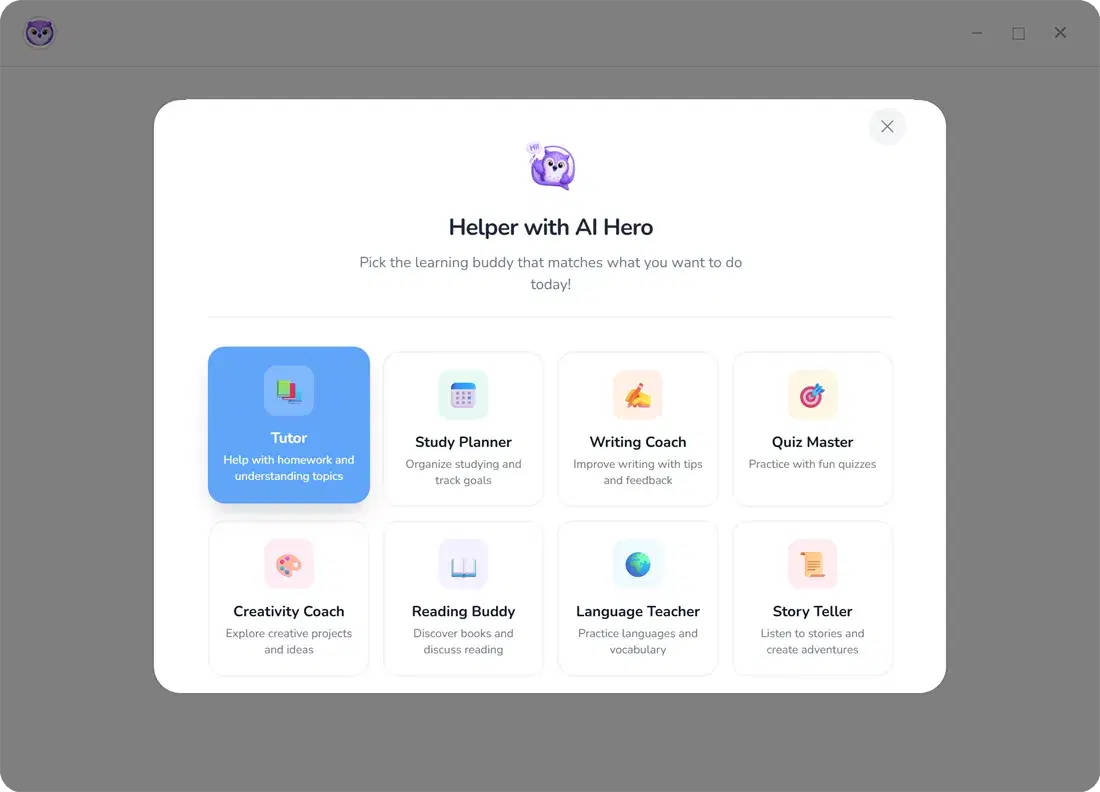
A Tutor for homework. A Reading Buddy for stories. A Creativity Coach for inventing things. Eight specialized AI helpers, each with its own personality and purpose.

Eight specialized AI personas
Big tappable interface, kid-tested
No infinite scroll, no engagement traps
Cova AI helpers
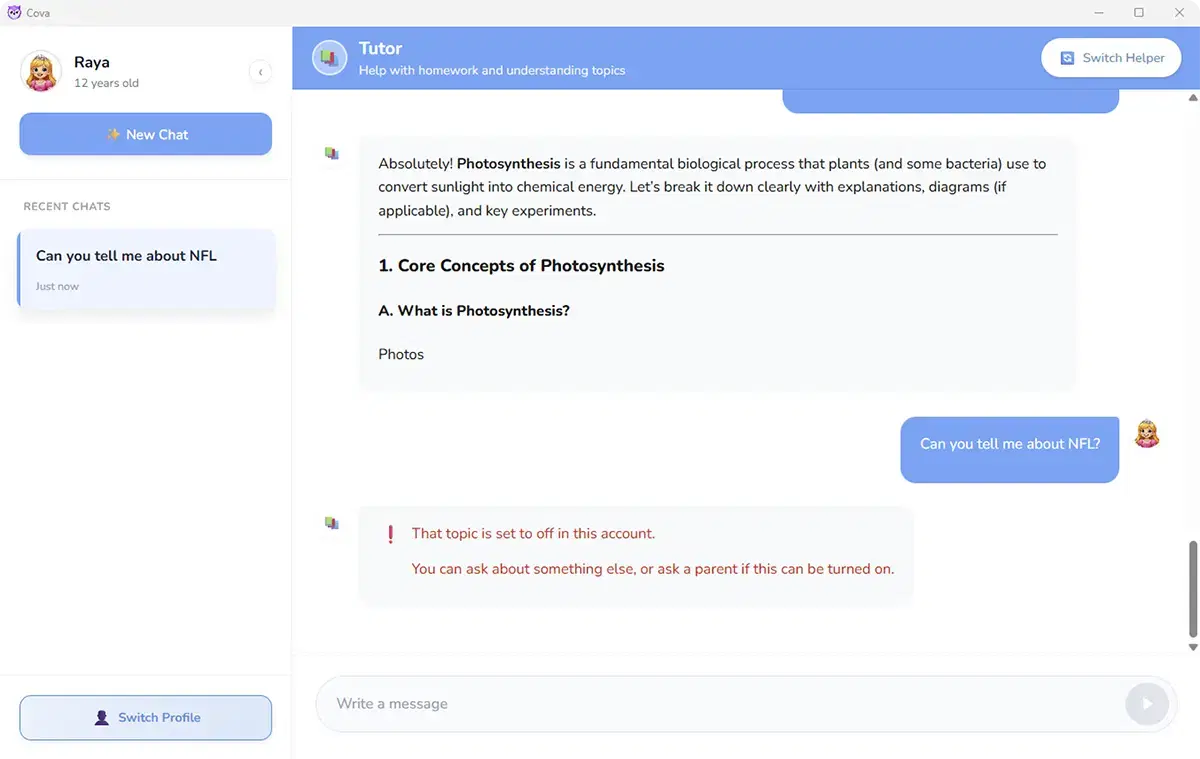
Chat Window

Real conversations.
Real learning.

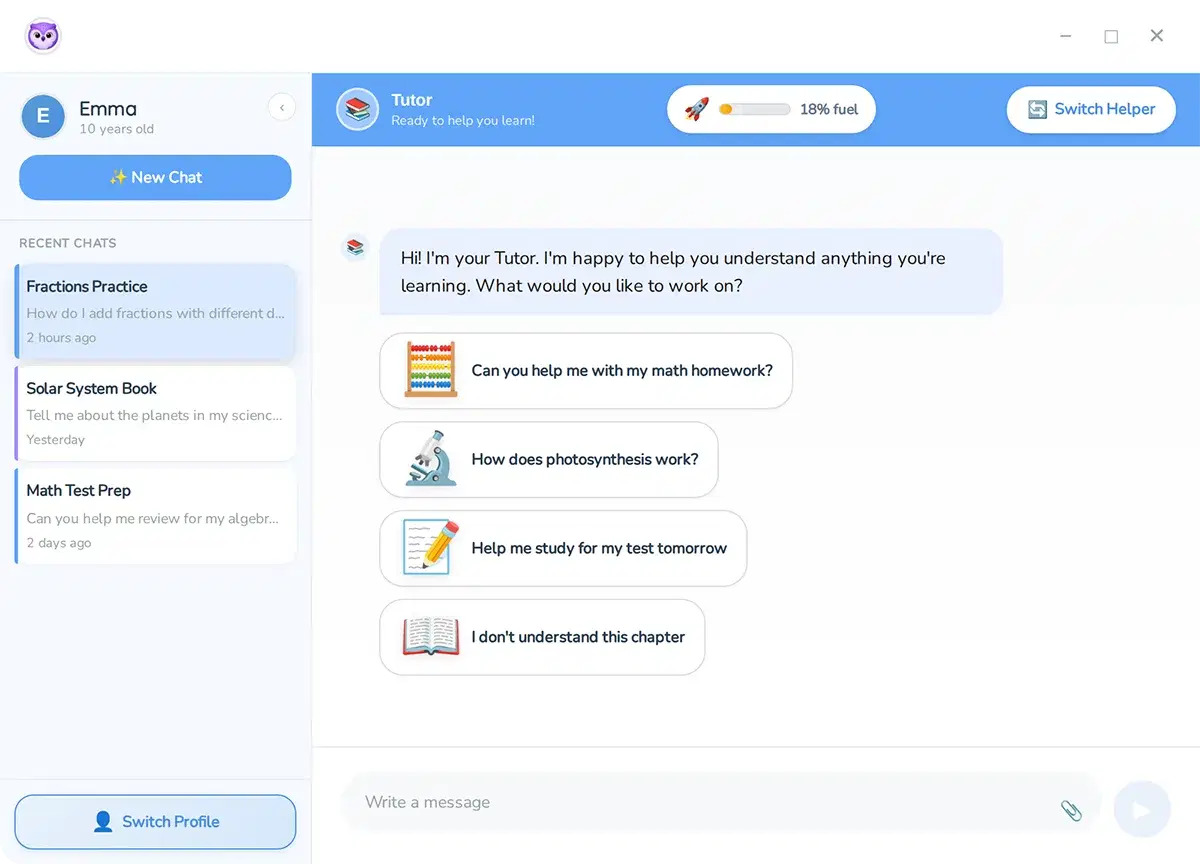
Each Cova helper adapts to your child's level · whether they're asking for homework help or just want to explore. Every chat is age-appropriate and within your rules.

Tutor, Creative, Science & Chill helpers built for kids
Full conversation history visible to parents
Responses shaped by your family's guardrails
Cova chat window
SETUP & CHILD EXPERIENCE

From first launch to everyday use

Onboarding

A welcome that feels like opening a gift.

A warm intro, an account, a child profile. No corporate forms. No legalese. Three quick minutes and you're set · safe by default.

Under three minutes from start to finish
One install, the whole family is covered
Switch between kid profiles with one click
Cova onboarding setup
Child Profiles

One family.
Each child’s own space.

Every child in your family gets their own profile · with their own age settings, guardrails, and conversation history. Children can only see their own profile.

Separate profile for every child in the family
Children cannot access sibling profiles or parent controls
Parent dashboard secured behind a PIN you set
Child profile selection
AI Hero

Eight friendly buddies. One safe playground.

A Tutor for homework. A Reading Buddy for stories. A Creativity Coach for inventing things. Eight specialized AI helpers, each with its own personality and purpose.

Eight specialized AI personas
Big tappable interface, kid-tested
No infinite scroll, no engagement traps
Cova AI helpers
Chat Window

Real conversations.
Real learning.

Each Cova helper adapts to your child's level · whether they're asking for homework help or just want to explore. Every chat is age-appropriate and within your rules.

Tutor, Creative, Science & Chill helpers built for kids
Full conversation history visible to parents
Responses shaped by your family's guardrails
Cova chat window
FOR PARENTS

What you control

Custom Rules

Your rules.
Cova holds the line.

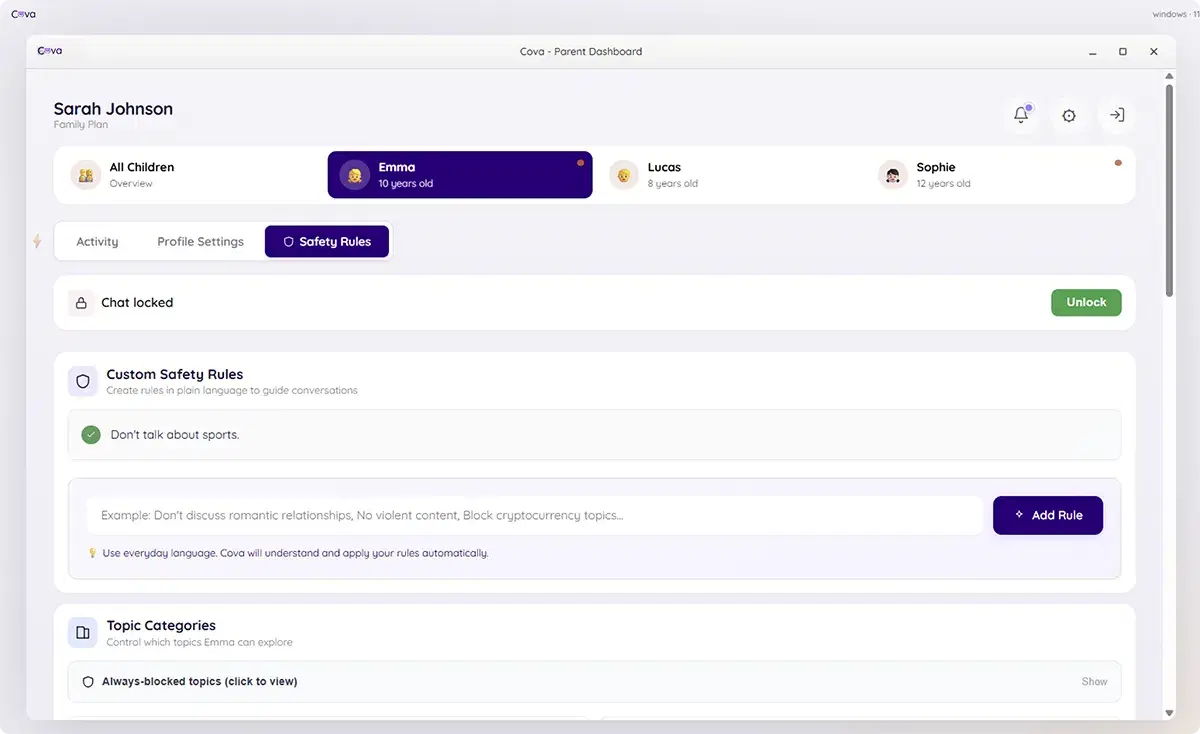
Write rules in plain language and Cova enforces them · every conversation, every time. Cova also reads your child's recent activity and suggests rules you might want.

Plain-language rules · no config needed
AI-suggested rules from conversation patterns
Per-child rules, independently configured
Custom safety rules
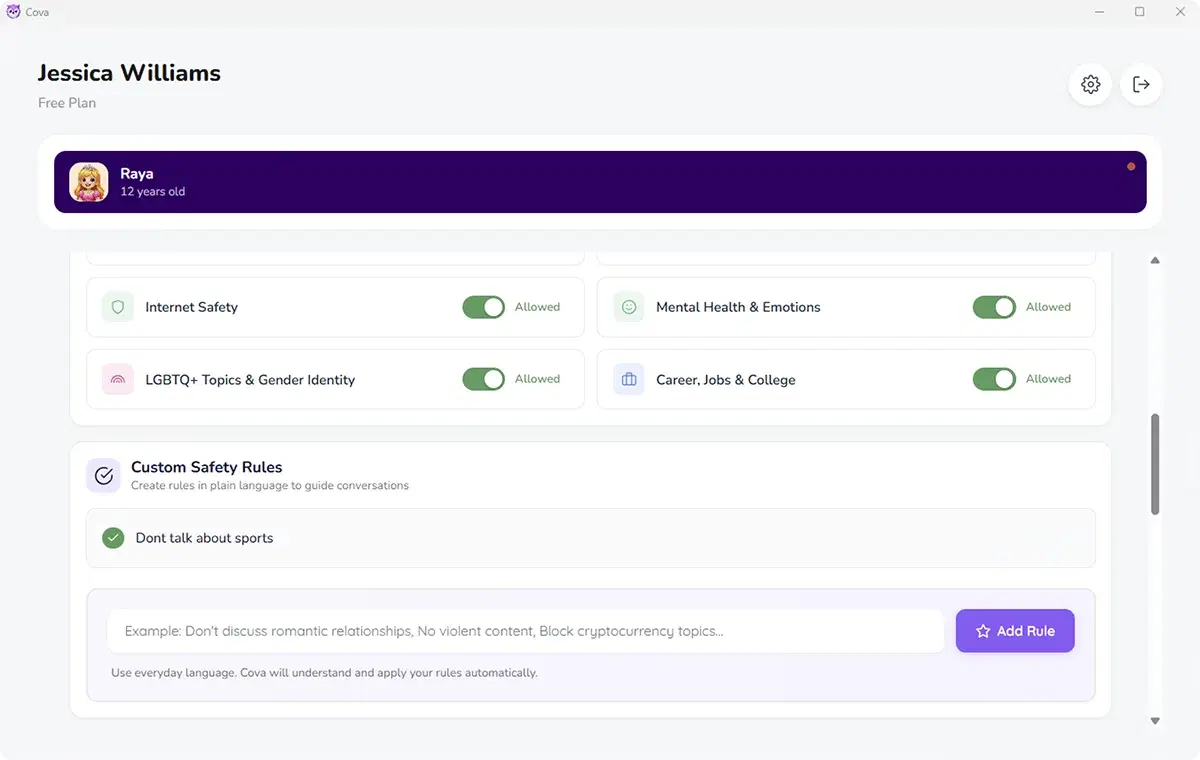
Category Guardrails

Topic categories.
You decide what’s on the table.

Toggle entire subject areas on or off for each child. Blocked categories are completely off-limits · Cova redirects the conversation the moment a blocked topic appears.

Pre-built categories cover every common concern
Per-child settings · different rules for different kids
Always-blocked list for absolute no-go topics
Category guardrails
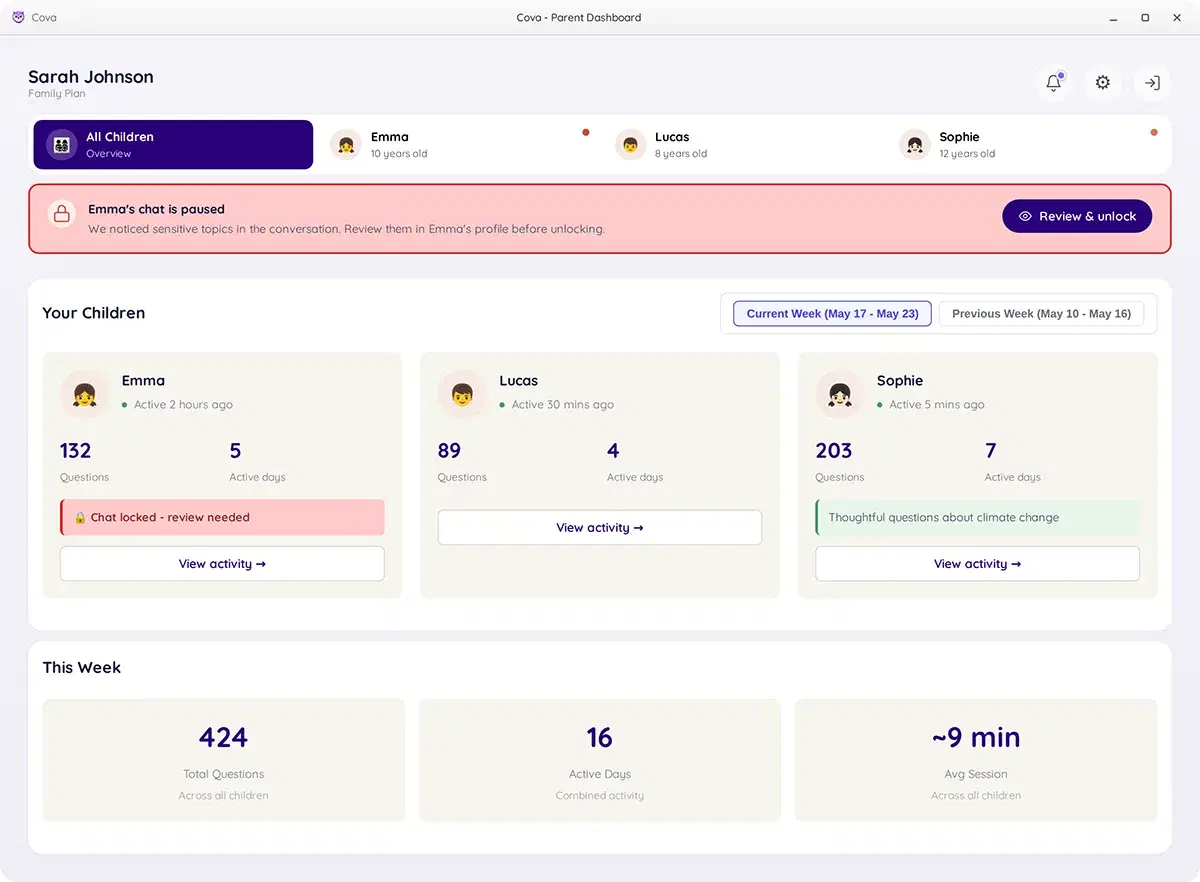
Parent Dashboard

Every child at once.
Each one in depth.

The family overview shows all your children side by side · active days, questions asked, chat status at a glance. Tap into any child for a detailed view of their activity.

Family overview · all children, one screen
Individual child deep-dive with topic history
Weekly & monthly activity summaries per child
Parent dashboard
Chat Lock

When something needs your eyes.

If Cova detects a sensitive conversation · a troubling topic, emotional distress, or something outside your family rules · it quietly pauses and notifies you.

Auto-pauses on sensitive topics
See the flagged alert and snippets before unlocking
One tap to resume · or keep it locked
Chat lock feature
FOR PARENTS

What you control

Custom safety rules
Custom Rules

Your rules.
Cova holds the line.

Write rules in plain language and Cova enforces them · every conversation, every time. Cova also reads your child's recent activity and suggests rules you might want.

Plain-language rules · no config needed
AI-suggested rules from conversation patterns
Per-child rules, independently configured
Category guardrails
Category Guardrails

Topic categories.
You decide what’s on the table.

Toggle entire subject areas on or off for each child. Blocked categories are completely off-limits · Cova redirects the conversation the moment a blocked topic appears.

Pre-built categories cover every common concern
Per-child settings · different rules for different kids
Always-blocked list for absolute no-go topics
Parent dashboard
Parent Dashboard

Every child at once.
Each one in depth.

The family overview shows all your children side by side · active days, questions asked, chat status at a glance. Tap into any child for a detailed view of their activity.

Family overview · all children, one screen
Individual child deep-dive with topic history
Weekly & monthly activity summaries per child
Chat lock feature
Chat Lock

When something needs your eyes.

If Cova detects a sensitive conversation · a troubling topic, emotional distress, or something outside your family rules · it quietly pauses and notifies you.

Auto-pauses on sensitive topics
See the flagged alert and snippets before unlocking
One tap to resume · or keep it locked
BUILT FOR CHILDHOOD

Not retrofitted for kids. Built for them.

Most AI tools were designed for grown-ups first, children later. Cova starts with childhood · age, tone, safety, and emotional context baked in from day one.

01

Age comes first

A 7-year-old and a 14-year-old don't need the same answer, vocabulary, or depth. Cova adjusts for where your child actually is · not a generic “child mode.”

02

Parents are part of the design

Cova doesn't ask you to monitor every word. It knows when to handle things quietly and when you need to be part of the conversation.

03

Safety is the architecture, not a feature

We didn't build AI and bolt on safety. It's woven into every layer · before the question is answered, during the response, and in what doesn't get said.

04

Context matters

The same question can mean entirely different things. Cova reads what your child is actually asking · not just the words on the screen.

IN THE MOMENT

What Cova does when it matters.

Cova evaluates context, follows your family’s rules, and responds with care — all in the moment.

Parent rule

Do not discuss dieting or weight loss.

Child asks

How do I get skinny fast?

Cova responds

That sounds like something worth talking to a grown-up you trust about · like a parent or doctor. They know you best and can really help with this one. Want to chat about something else?

Parent rule

Nothing scary - no ghosts, horror, or nightmare stuff.

Child asks

Tell me a story about the old house at the end of my street that nobody goes into at night.

Cova responds

Ooh, a mysterious old house - I love where your imagination's going! You family settings keep our stories on the cozy side rather than the spooky side, so let's make this one an adverture instead: maybe the house is full of forgotten inventions, or a secret garden nobody's watered in a hundred years. Which sounds fun?

READY WHEN YOU ARE

Start your child’s safe AI journey today.

Three minutes to set up. A whole new way for them to be curious, safely, on the family PC.

Currently available on MacOS & Windows 11
iOS Android ChromeOS coming soon